
Shut the doors bots use in 5 minutes with Site Hardening Plugin, a WordPress security plugin
Site Hardening Plugin is a lightweight WordPress security plugin for owners who run their own site. When an admin logs in or something changes, you get a plain email. You hear it from your own inbox, not from a customer.
Every protection is on the moment you click Activate Plugin, with nothing to check each day. It costs $30 a year, and every protection keeps working if you cancel.
You need a WordPress site you can log into as an admin. You do not need Claude.
The plan is $30 a year. It renews every year on its own until you cancel. You can cancel any time from the link in your receipt, and the next charge stops. For Site Hardening Plugin, there’s no refund on the first year. A yearly renewal charge on Site Hardening Plugin is refunded in full if you ask within 14 days of the charge.
Worst case, you spend $30 and keep every protection, just without updates. You can get help any time at thepaidpath.com/help.
Bots hit every WordPress site, and owners often find out too late
Bots don’t care whose site it is. They hit every WordPress site they can find, all day. First they ask your site for its usernames. Then they try passwords, over and over. They also knock on old back doors that many owners never knew were open.
A break-in can put spam on your pages or a warning next to your site in Google. Many owners find out after the damage, when a customer calls or the site goes down. You have a business to run, and you can’t watch your site every hour.
What changes for you when it’s on
Your site has fewer open doors. Bots can’t pull your usernames from the usual places. A bot that can’t find a username has to guess 2 things, not 1. When 1 address fails 5 logins in 15 minutes, it is locked out for 15 minutes. An old back door called XML-RPC stays shut.
You hear about it first. When an admin logs in, you get an email with the time and their internet address. When a new admin shows up or a plugin changes, you get 1 plain email. You don’t need to log in to know what changed.
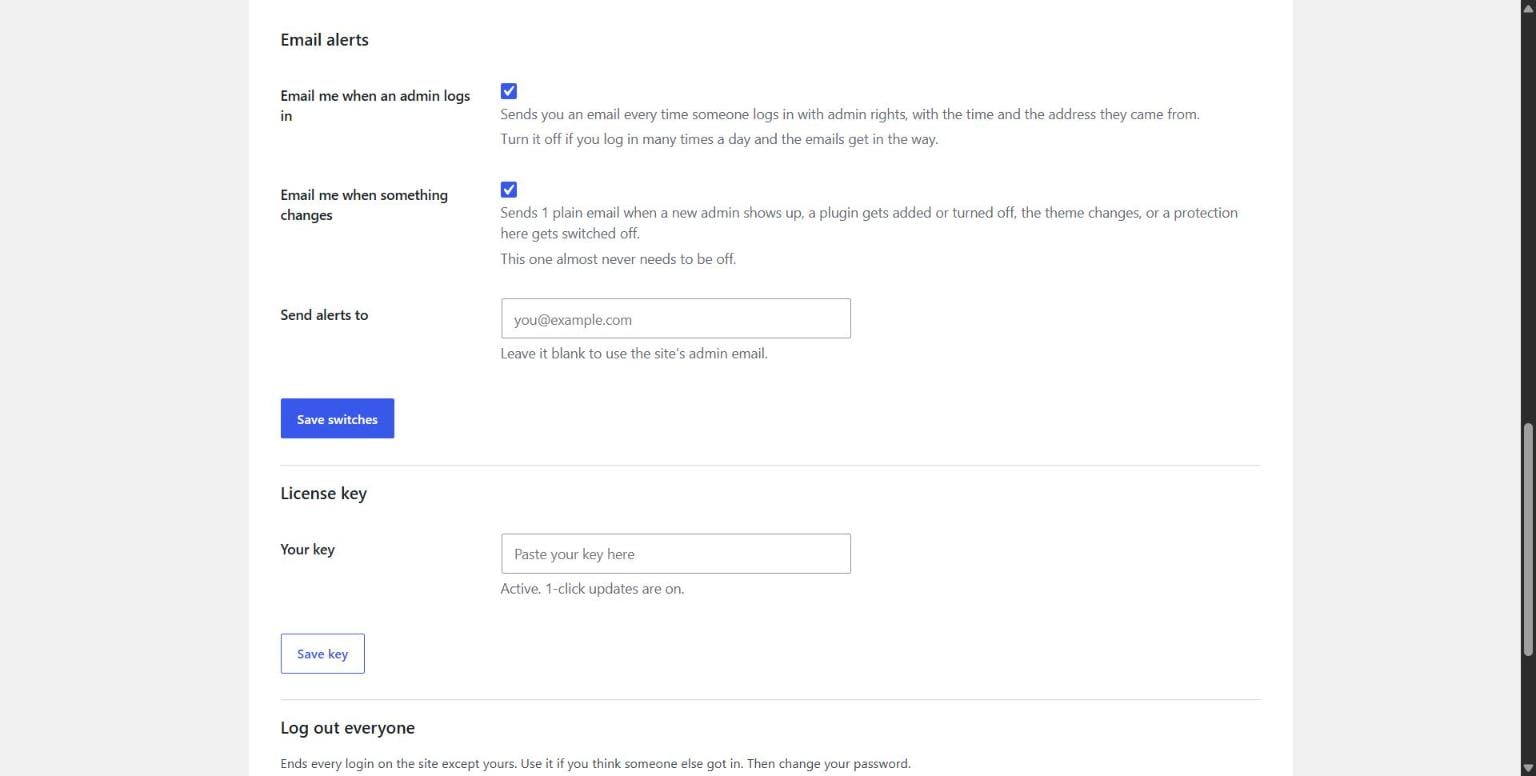
You stop babysitting your site. Every protection is on the moment you activate it. There is no dashboard to check each day and no scan to run. Each switch says in plain words what it blocks and when to turn it off.
Set it up in about 5 minutes
- After you pay, your download page opens with the plugin file and your license key. Copy the key into a note, because the page stops opening 7 days after checkout.
- In wp-admin, go to Plugins, then Add New Plugin, then Upload Plugin. Click Choose File, pick
site-hardening.zip, click Install Now, and click Activate Plugin. - Go to Settings, then Site Hardening. Paste your key in the Your key box, and click Save key.
Every protection is already on when you finish. Each switch says when to turn it off, like when Zapier or Jetpack connects to your site.
Do you want to see it work? Add /xmlrpc.php to the end of your site’s address in a new tab. Unless your host blocks it first, you see XML-RPC is turned off on this site.
Do you want it done for you? If you have Claude Pro and Claude in Chrome, use the Claude setup file. Drag it into Claude Desktop, and Claude walks you through the rest. It reads your plugins and tells you which switches your site needs off and why. It changes only this plugin’s settings, and only after you say yes. Then it checks your site from the outside and reports back in plain English. You still upload the plugin file and paste your key yourself.
Everything you get for $30 a year
- The plugin shuts the common doors bots use. It has 13 switches on 1 screen, and every switch is on from the first click.
- You get 2 plain emails that warn you first. 1 comes when an admin logs in, and 1 comes when something on your site changes.
- The lockout list shows the bots it stopped. Each row shows the time, the internet address, and the username the bot tried.
- The Log out everyone button is your panic button. It ends every login but yours if you think someone got in.
- The Claude setup file does the setup with you. Claude reads your plugins, sets your switches with your OK, and checks your site from the outside. It needs Claude Pro and Claude in Chrome, and the plugin works fine without it.
- The AI help page answers any time, day or night. The Get help button fills in your site details, so you don’t explain a thing. The report holds no passwords, emails, or usernames.
- 1-click updates keep the plugin current. They keep coming while your subscription runs.
- Every protection stays yours if you cancel. Nothing shuts off, and you only stop getting updates.
I run it on my own sites
I run this plugin on my own WordPress sites. On November 3, 2026, my site thepaidpath.com got checked the way a bot sees it. A request for my list of usernames got nothing back. Author lookups landed on my home page, and XML-RPC answered with a no. My WordPress version was hidden too.
On the same day, I tested it on a staging copy of a live site on Rocket.net. Wordfence, Really Simple Security, and the Astra theme were all turned on. Every protection in Site Hardening Plugin still worked beside them. On Rocket.net behind Cloudflare, it reads the real visitor address.
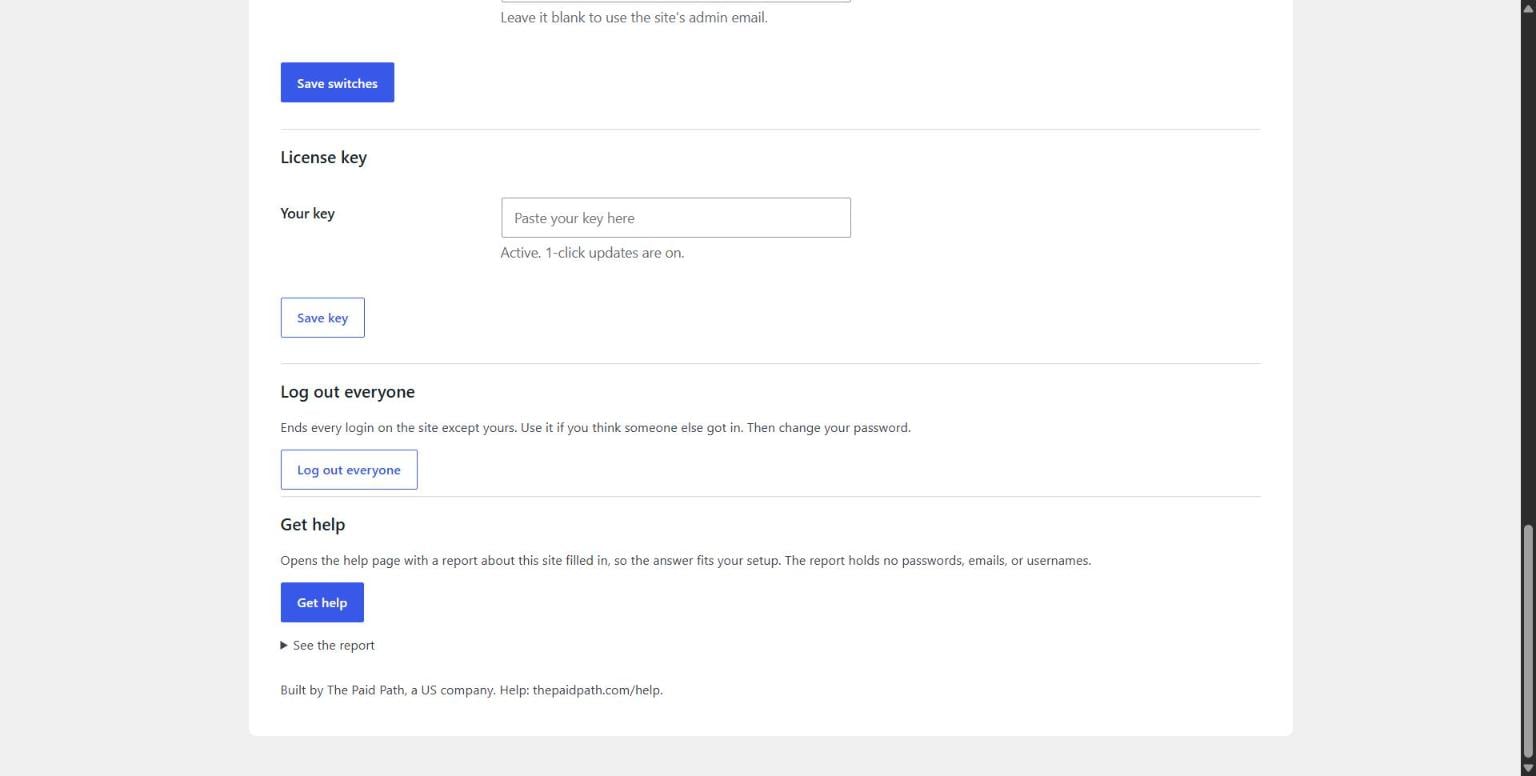
I kept it small on purpose, with 13 switches on 1 settings screen. It runs no firewall and no scans, so it stays light. Every screenshot on this page shows the real plugin screen.
Cancel any time, and every protection keeps working
Some security tools stop protecting you the day you stop paying. This plugin does not shut off when you cancel. Your usernames stay hidden, lockouts keep working, and XML-RPC stays shut. The alert emails keep coming too. You stop getting updates, including fixes, and that’s all you lose. The help page still works without a key.
So your $30 a year pays for updates, not for the right to stay protected. You can cancel any time from the link in your receipt.
Who should skip this plugin
- If you want a firewall or a malware scanner, keep or add one of those instead.
- If your site is already hacked, this plugin does not clean it up. It works on doors before a break-in.
- If you want 2-factor login, a free plugin from WordPress.org covers that.
- If you want to move your login page, this plugin does not do that.
- If your site runs WordPress older than 6.0 or PHP older than 7.4, it won’t run. Your host can tell you both.
- If you can’t log into your site as an admin, you can’t install it.
$30 a year, and it renews on its own
There is 1 plan at $30 a year, and there is no monthly option. That comes to less than 9 cents a day to keep your site a harder target.
If a site does get hacked, the clean up costs real money. Sucuri is a company that fixes hacked WordPress sites. On November 3, 2026, Sucuri’s page showed its Basic plan at $199.99 a year. That plan cleans up hacks, and it also runs a firewall and scans. This plugin does none of those things. It works on the doors before a break-in, for $30 a year.
If you cancel, every protection stays on, and you stop getting updates, including fixes. The $30 a year keeps 1-click updates coming.
Support is AI first, so the help page answers your question right there. The Get help button sends your site report along with it. You can find the help page at thepaidpath.com/help.
You need a WordPress site you can log into as an admin. You do not need Claude. The Claude setup file is a bonus for people with Claude Pro and Claude in Chrome.
The plan is $30 a year. It renews every year on its own until you cancel. You can cancel any time from the link in your receipt, and the next charge stops. For Site Hardening Plugin, there’s no refund on the first year. A yearly renewal charge on Site Hardening Plugin is refunded in full if you ask within 14 days of the charge.
Under the hood of a lightweight WordPress security plugin
Here is what each part does, for anyone who likes the details. It does not scan for malware, and it is not a firewall. It shuts the common doors bots use before a break-in.
Hide your WordPress username and stop user enumeration
A bot that knows your username only has to guess the password. The plugin closes the 5 most common places WordPress gives away usernames. You find these switches under Settings, then Site Hardening, in Hide your usernames.
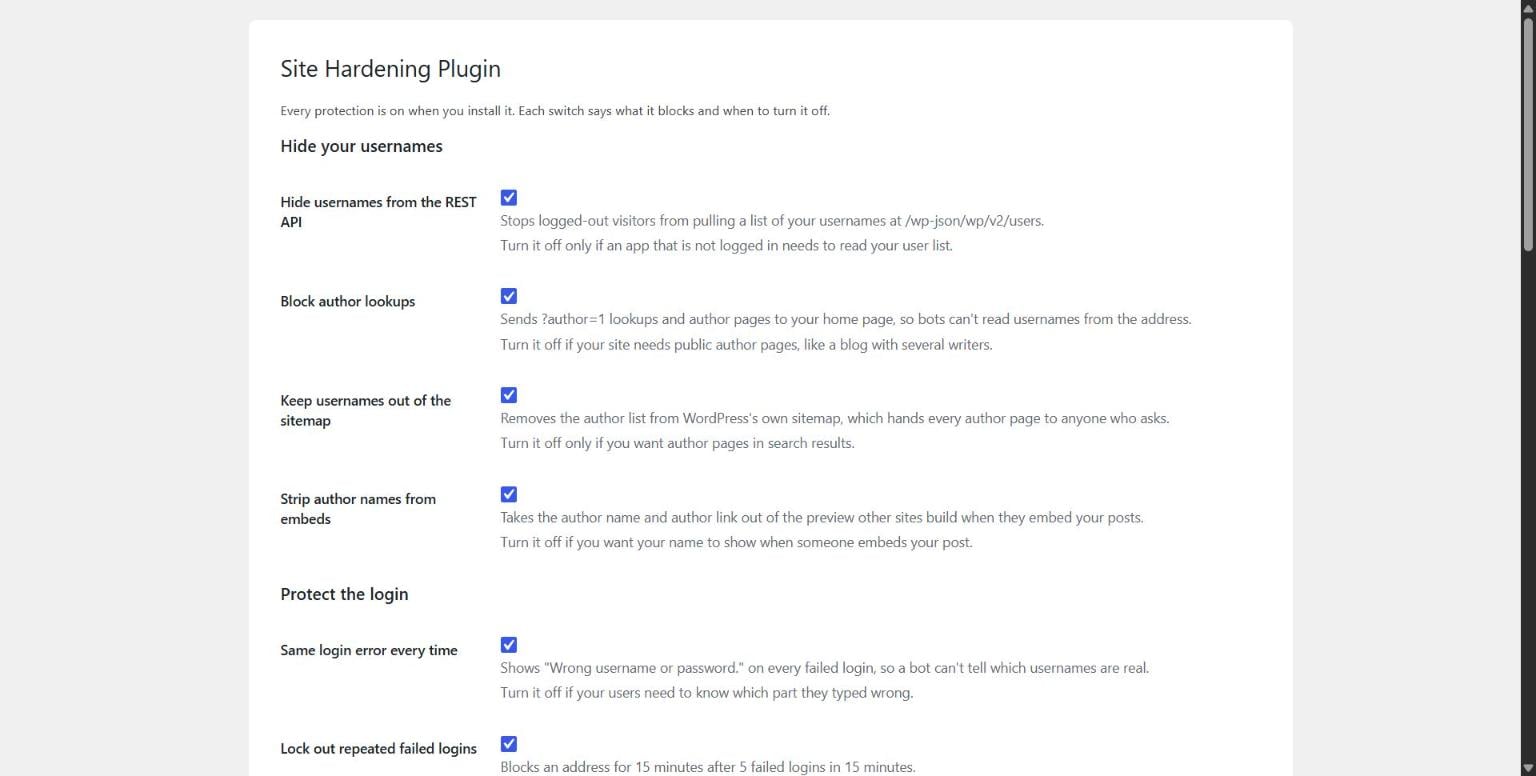
- Logged-out visitors can’t pull your usernames from the REST API at
/wp-json/wp/v2/users. - It sends
?author=1lookups and author pages to your home page. - It keeps the author list out of WordPress’s own sitemap.
- It takes the author name out of embed previews on other sites.
- It shows the same “Wrong username or password.” message on every failed login. That way, a bot can’t tell which usernames are real.
The lost password page and a lockout each show their own message. Neither message gives away a username. If you run a blog with several writers, turn off Block author lookups. The other switches stay on.
WordPress login lockout: limit login attempts and stop brute force
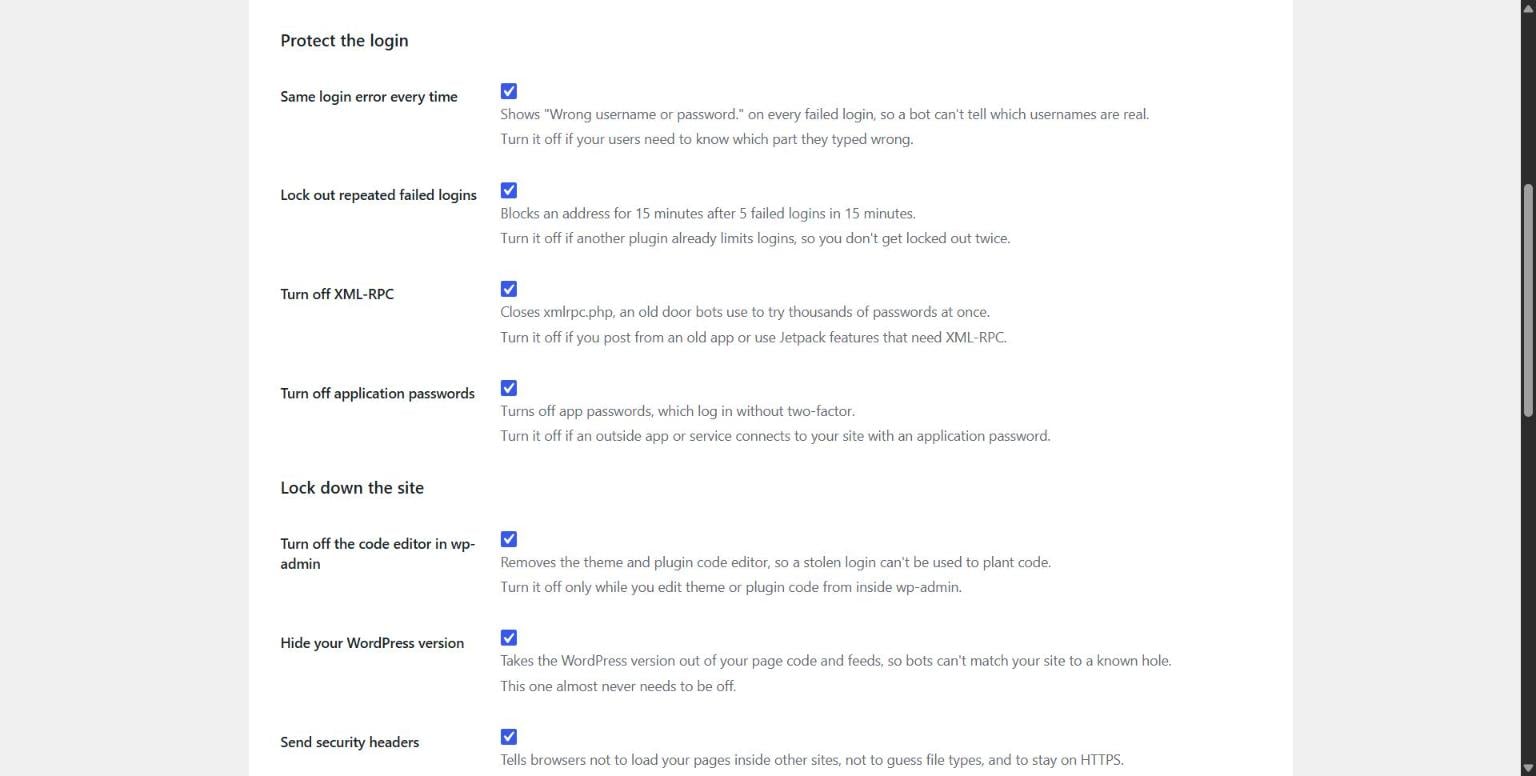
When 1 address fails 5 logins in 15 minutes, it is locked out for 15 minutes. During the block, even the right password gets refused. This keeps brute force password guessing in check.
Many sites sit behind Cloudflare, and Cloudflare hides the real visitor address. This plugin reads the real address from Cloudflare only when the request truly came from Cloudflare. It never trusts a header that anyone can fake. On Rocket.net behind Cloudflare, it reads the real visitor address.
The plugin pauses lockouts only when the visitor address is private, reserved, or a Cloudflare address. It tells you why on the settings screen. Locking 1 of those addresses would lock out everybody. Behind any other proxy, turn off Lock out repeated failed logins for now. Turn it back on once your host confirms it passes real visitor addresses.
The plugin also turns off application passwords, because they let an app log in without 2-factor. If Zapier, Make, or the WordPress app connects to your site, turn that switch off first. If another plugin already limits your logins, turn off the lockout switch here.
Disable XML-RPC in WordPress and block xmlrpc.php
XML-RPC is an old door in a file called xmlrpc.php. Bots use it to try thousands of passwords at once. The plugin answers that file with a 403, which means no.
Do you post from an old app or use Jetpack features that need XML-RPC? Then turn that switch off.
WordPress security headers and a locked down site
The plugin sends security headers that tell browsers how to treat your pages. Browsers won’t load your pages inside other sites or guess at file types. They also stick to HTTPS for the next year. Turn the headers switch off on any site that still loads over plain HTTP. If your host or Cloudflare already sends these headers, turn the switch off too.
The plugin takes your WordPress version out of your page code and feeds. That way, bots can’t match your site to a known hole. It also takes the theme and plugin code editor out of wp-admin. A stolen login then can’t plant code through that editor.
WordPress email alerts in plain English when something changes
When an admin logs in, the plugin emails you the time and their internet address. You choose where alerts go in the Send alerts to box under Email alerts.
When something on your site changes, you get 1 plain email. It covers a new admin and a plugin added, turned on, turned off, or deleted. It also covers a security plugin turned off, a theme change, and a protection switched off. The plugin waits about 5 minutes, so a burst of changes lands in 1 email. Sites that can’t send mail need an SMTP plugin before these emails can arrive.
2 buttons help when you need them. Log out everyone signs out every user except you. Get help opens the help page with a report about your site filled in. The report holds no passwords, emails, or usernames. You can read it first under See the report.
Questions people ask
Can I set it up if I’m not technical?
Yes, and you don’t touch any code. You upload 1 file, click Activate Plugin, and every protection is on. Each switch says in plain words what it blocks and when to turn it off. If you have Claude Pro and Claude in Chrome, the Claude setup file walks you through it. The AI help page answers your questions any time, day or night.
Does Site Hardening Plugin work behind Cloudflare?
Yes, it works behind Cloudflare. It reads the real visitor address only when the request truly came from Cloudflare. It never trusts a header that anyone can fake. On Rocket.net behind Cloudflare, it reads the real visitor address. It pauses login lockouts only when the visitor address is private, reserved, or a Cloudflare address. When that happens, it tells you on the settings screen. Behind any other proxy, turn off Lock out repeated failed logins for now. Turn it back on once your host confirms it passes real visitor addresses.
Does it work with Wordfence or another security plugin?
Yes, it worked beside Wordfence in my test. On November 3, 2026, I ran it on a staging copy of a live Rocket.net site. Wordfence, Really Simple Security, and the Astra theme were turned on, and every protection still worked. I haven’t tested every security plugin. If another plugin already does the same job, turn off the matching switch here.
What happens when the subscription ends?
Every protection stays on, and the alert emails keep coming. You stop getting updates, including fixes, until you renew. You can cancel any time.
Is this a Wordfence alternative?
It is an alternative only for some jobs. Wordfence has a free version, and it is a firewall and a malware scanner. Site Hardening Plugin does the narrow hardening jobs, like usernames, password guessing, and XML-RPC. It also emails you when something changes. If you want a firewall, keep Wordfence and run this plugin beside it.
Does it clean up a hacked site?
No, it does not clean up a hacked site. It works on the common doors before a break-in. It does not scan for planted code or remove it. The help page doesn’t cover clean up either. If your site is already hacked, call your host or a clean up service.
Does it talk to any outside service?
It checks thepaidpath.com for updates and sends 3 things. Those are your license key, your site’s address, and the plugin version. The Get help button sends a report about your site only when you click it. The report holds no passwords, emails, or usernames.
Can Claude set up Site Hardening Plugin for me?
Yes, if you have a paid Claude plan, like Pro, and the Claude in Chrome extension. After you buy, you get a Claude setup file. Drag it into Claude Desktop, and Claude reads your plugins and picks the switches that fit. It changes only this plugin’s settings, and it asks before it saves. Then it checks your site from the outside and tells you what passed. You still upload the plugin file and paste your key yourself. You do not need Claude to use the plugin.
Site Hardening Plugin is an independent product of The Paid Path LLC. WordPress, Wordfence, Sucuri, Cloudflare, and Anthropic do not make, endorse, or sponsor it. WordPress is a trademark of the WordPress Foundation. Every other brand named here belongs to its owner, and none of them sponsor it.
The plugin code is licensed GPLv2 or later. Nothing here promises a result, and no plugin can promise a site will never be broken into. If you run a business, you can read more on the business owners page.
I sell other tools too, and you can see them on the products page.